Free Canada invoice templates
Download a clean, professional invoice in seconds.
Preview the layout, then download a ready-made invoice template for Canada as PDF, Google Sheets, Google Docs, Microsoft Excel, or Microsoft Word. Fully editable and ready to send to clients.
- ✓Designed for Canada businesses and freelancers.
- ✓Edit totals, taxes, and client details in seconds.
- ✓Perfect for sending as PDF or printing.
No sign-up required · Free to download · Works on desktop & mobile

Invoice24 Template
Preview for Canada
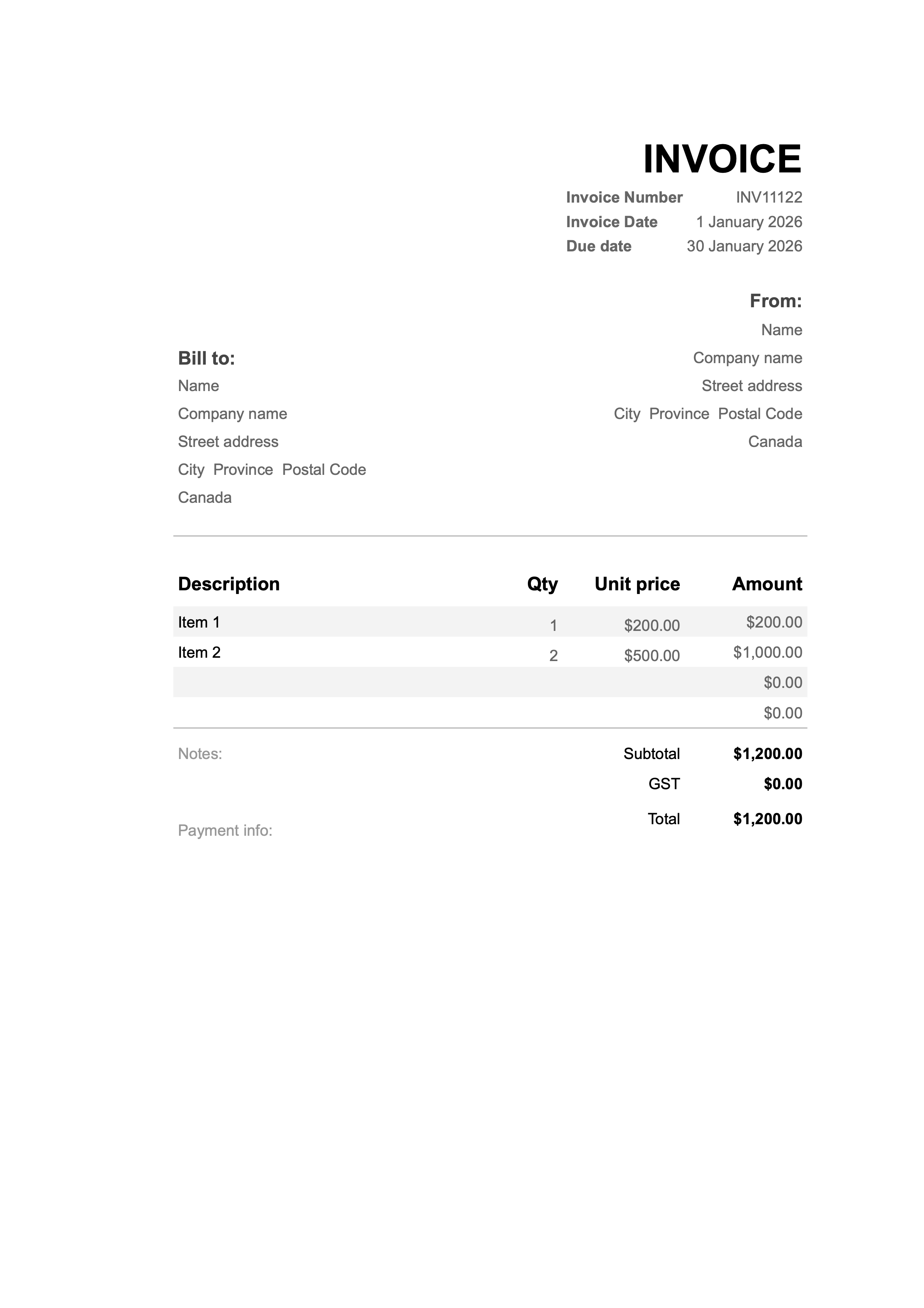
What you see here is exactly what you'll download – ready to customise with your own business and client details.
Canada invoice template & free downloadable sample
This page gives you a practical, SEO-friendly Canada invoice template you can duplicate in Google Sheets, Google Docs, Excel or Word. The layout is already set up with all the core invoice fields: invoice number, dates, client details, line items, tax and totals. You simply replace the example numbers (like INV11122 and £200.00) with your own figures, then save or export your invoice as a PDF.
About this Canada invoice template
The template is built around a classic professional invoice layout used by many small businesses and freelancers in the Canada. At the top, there is a bold INVOICE heading with an Invoice Number (for example INV11122), an Invoice Date (such as 1 January 2026) and a Due date (for example 30 January 2026). These fields help you and your client track when work was billed and when payment is expected.
Beneath that, the template clearly separates the sender and the client: a “From” block for your own details and a “Bill to” block for your customer. This makes it obvious who issued the invoice and who is responsible for payment, which is especially important if you work with multiple trading names or group companies.
Fields included in the Canada invoice template
Exact legal requirements can change, so always check guidance from your local CRA or a qualified accountant. As a practical starting point, this invoice template includes the core fields most businesses in the Canada need:
- Invoice heading & references – a clear “INVOICE” title, invoice number, invoice date and due date so you can track your billing history.
- From (your details) – your name or trading name, company name (if different) and space for your full address and contact details.
- Bill to (client details) – your customer’s name, company name and a structured address block (street address, city, postcode or ZIP and state/province as required in the Canada).
- Itemised table – columns for Description, Qty, Unit price and Amount, so you can list items such as “Item 1 – 1 × 200.00” and “Item 2 – 2 × 500.00” and let your spreadsheet calculate the totals.
- Subtotals and discounts – the table supports multiple lines, so you can insert extra rows for delivery, discounts or additional services before the subtotal if you wish.
- Tax (gst/hst) – a dedicated Tax row where you can show the amount of gst/hst or other applicable tax charged on the invoice.
- Invoice totals – a Subtotal and a final Total row so it is always clear what your client owes in their local currency.
- Notes – a free text area for project references, purchase order numbers or a friendly thank-you message.
- Payment info – a dedicated area where you can add bank details, payment links, IBAN/SWIFT information or standard payment terms like “Payment due within 30 days”.
- Tax registration details – space to add your GST/HST registration number if you are registered for tax in the Canada.
- Indication of which tax rates (GST, HST, PST or QST) apply to each line
- Your payment terms and accepted payment methods
How to use this Canada invoice template (step by step)
- Choose your preferred format. Open the template in Google Sheets, Google Docs, Microsoft Excel or Word. Save your own copy so you can edit it freely.
- Add your business identity. Replace the placeholder name and company with your real details. Add your logo at the top if you like, and include any registration numbers or tax IDs that apply in the Canada.
- Enter your client’s details. In the “Bill to” section, fill in your customer’s name, company, street address, city and postcode/ZIP. Accurate client details make it easier to match payments and resolve any disputes.
- Set invoice number and dates. Update the invoice number (for example INV11123, INV11124), choose the invoice date and set a clear due date based on your payment terms.
- List the products or services. For each line in the table, enter a short description, the quantity (hours, units, days) and the unit price. Let your sheet or document calculate the line total and subtotal for you.
- Add gst/hst and check the total. Use the tax row to show how much gst/hst or other tax is included. Then confirm that the final total matches what you have agreed with the client.
- Fill in notes and payment information. Use the “Notes” and “Payment info” sections to add bank details, late-fee policies, purchase order references or anything else your client needs to pay you correctly and on time.
- Save, export and send. Finally, save the invoice in your files and export it as a PDF from your chosen tool. You can then email it or upload it to your invoicing or accounting system.
Making this Canada invoice template compliant
This template is designed as a practical starting point that follows common invoice conventions used in the Canada. However, the official rules for invoicing and gst/hst reporting can change over time. For full compliance, you should always check the latest guidance from your local CRA or speak to a qualified accountant in the Canada.
In most cases, making the template compliant means ensuring that your business and client details are complete, your tax registration numbers are clearly shown where required, your invoice numbering is sequential and your tax breakdown is easy to understand. Once you have customised the template once, you can reuse it again and again with confidence.
FAQs about Canada invoice templates
- Is this Canadian invoice template free?
- Yes. This Canadian invoice template is free to download and reuse. Open it in Excel, Word, Google Sheets or Google Docs, save a copy for your business and use it every time you issue an invoice to a client.
- Can this template show GST/HST and provincial taxes?
- Yes. The invoice template includes line items, a subtotal and a tax row so you can show GST, HST and any applicable provincial taxes (such as PST or QST). You can label tax amounts clearly and, if you are registered, display your GST/HST registration number on the invoice.
- What’s included in the Canadian invoice template layout?
- The layout includes an invoice number, invoice date and due date, “From” and “Bill to” sections with address details, an itemised table with Description, Qty, Unit price and Amount, a subtotal row, a dedicated tax row and a final “Total” field. There is also space for notes (for example late-fee policies) and payment information such as bank details or Interac instructions.
- Can I export invoices from this template as PDF?
- Yes. After you finish filling out the invoice in your chosen tool, simply use the “Save as PDF” or “Download as PDF” function to create a professional PDF copy. This is usually the best format for sending invoices by email or storing them in your records.




